We’ve opened up a beta with AI features. These features are free on all plans for now, but because they are powered by paid third-party AI platforms, we may charge for them in the future.
Here’s how AI features work in JobScore:
- All AI features are enabled by default and are optional. Users with the owner and admin access levels can turn AI features on and off on the Admin > Compliance > AI Features page.
- JobScore leverages AI to generate summaries, first drafts, and recommendations for you to review, adjust, and approve.
- If you are unhappy with any content AI adds to a form, type Ctrl + Z (Command ⌘ + Z on a Mac) to undo it.
- JobScore AI features do not perform recruiting actions for you at this time. If you’d like JobScore to act unsupervised on your behalf, please use automations.
- Features that leverage AI have their own color scheme and show the AI icon

- After you use AI, JobScore prompts you to rate your experience to help us improve.
- If you need to perform an AI audit, JobScore keeps track of every time your team uses AI along with the requesting user, use case, prompt, and result.
Our first set of AI features makes it easier to do things many of you are already doing using ChatGPT, Google Gemini, Claude, Microsoft Copilot, and Perplexity. Here’s what we’ve added so far:
Generate job descriptions
JobScore uses AI to analyze information about your job and your company, then generates a job description for you to review, adjust, and approve.
Generate scoring criteria for jobs
JobScore uses AI to analyze your job and recommend criteria you can use to score and rank candidates.
JobScore uses third-party technology to parse job descriptions to suggest scoring criteria for you to review and approve. We do not use Large Language Models that hallucinate to generate candidate scores.
Generate similar job titles to improve candidate scores
JobScore uses AI to recommend similar job titles, which help make candidate scores more precise.
Generate sample interview questions for candidate ratings
JobScore uses AI to generate interview questions that help your team assess candidates for specific rating criteria.
Generate interview questions for specific candidates based on their resume
JobScore uses AI to recommend interview questions by performing gap analysis between a candidate’s resume and a job description.
Summarize candidate activity
JobScore uses AI to analyze candidates’ activity history (job assignments, workflow stage changes, notes, emails, interviews, etc.) and generate abbreviated summaries so you can understand what’s happening with a glance.
Refine Text
JobScore uses AI to refine selected text when editing job descriptions, email messages, notes, and interview feedback.
Turn AI features ON and OFF
All AI features are turned ON by default, but can be turned OFF at your convenience. When turned OFF, AI features cannot be used by anyone in your account.
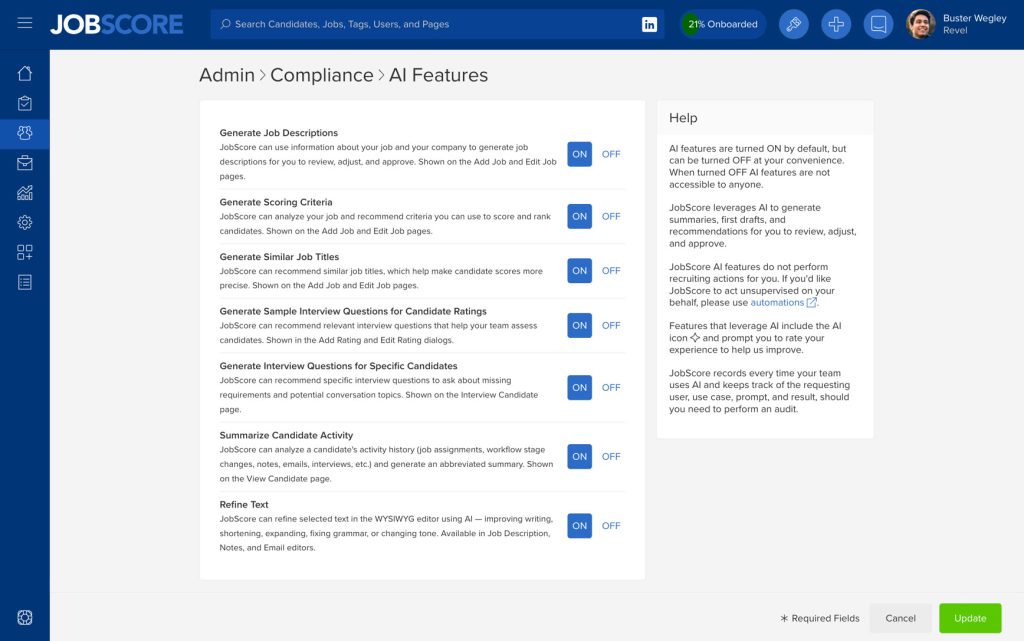
Should you need to perform an audit, JobScore records every time your team uses AI and keeps track of the user, use case, prompt, and result.
We have many more ideas on how to simplify and improve your hiring using AI in JobScore, like interview intelligence and AI chat. Please take our AI survey here; your answers will determine what we work on next.